
本教程實現DEDECMS功能:文章模型整合下載功能,可判斷點數,會員組等下載權限,前臺可判斷是否有附件下載,有則顯示,沒有則不顯示。適用類型:有些文章有下載地址,有些文章沒有下載地址的網站。想附件收費的網站等等……具體就不啰嗦了。用得上您就拿走。
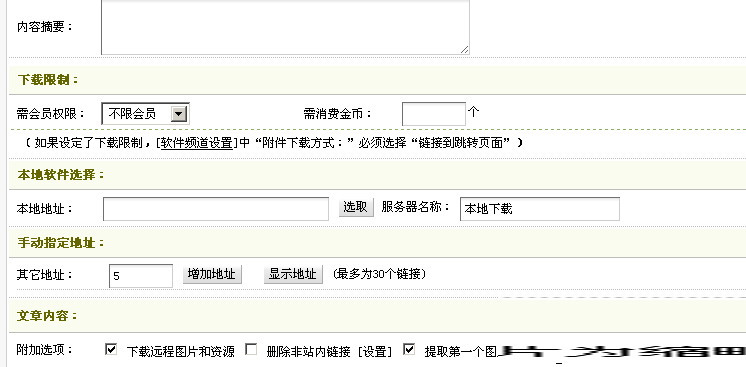
后臺效果圖
本教程為站長似水星辰原創,轉載注明出處。
注:本教程中的金幣和會員組設置只針對下載連接有效。不對文章內容生效,和文章本身的閱讀權限和消費金幣并不沖突,是分開設置的。文章中所有sql語句中涉及表名的,請把表前綴換成您自己的表前綴。如:js_addonarticle 換成 您的表前綴_addonarticle。
一、首先規劃要加入的字段
下載鏈接:softlinks
消費金幣:needmoney
會員組權限:daccess
這些字段要加入到文章附加表中,前綴_addonarticle,也可以根據自己情況加入需要的表中,自己修改就行了。
進入后臺系統-SQL命令行工具,執行:
1ALTERTABLE`js_addonarticle`ADD`softlinks` TEXTNOTNULL,2ADD`needmoney`SMALLINT( 5 )NOTNULL,3ADD`daccess`SMALLINT( 5 )NOTNULL
也可以在phpmyadmin中自行添加。
然后在后臺打開核心-頻道模型-內容模型管理-普通文章-修改-字段管理,在模型字段配置(文本模式) 里添加
- <field:softlinks itemname="軟件地址" type="softlinks" isnull="true" default="" rename="" />
- <field:daccess islist="1" itemname="下載級別" type="int" isnull="true" default="0" rename="" function="" notsend="1"/>
- <field:needmoney islist="1" itemname="需要金幣" type="int" isnull="true" default="0" rename="" function="" notsend="1" />
如果不添加則會出現無鏈接信息錯誤!請務必添加。
二、數據庫字段添加完畢就要修改文章模型的4個文件了。分別是dede管理目錄下的article_add.php,article_edit.php和管理模板article_add.htm,article_edit.htm,打開這4個文件依次修改。
1、修改article_add.htm,在頭部的<script></script>中加入以下,在</script>之前加入就行
01var startNum = 0;02functionMakeUpload()03{04var upfield = document.getElementById("uploadfield");05var endNum = parseInt(document.form1.picnum.value) + startNum-1;06if(endNum > 30) endNum = 30;07for(startNum; startNum<=endNum; startNum++){08upfield.innerHTML +="<div style='line-height:36px'>軟件地址"+startNum+":<input type='text' name='softurl"+startNum+"' style='width:280px' value='http://' /> 服務器名稱:<input type='text' name='servermsg"+startNum+"' style='width:150px' /></div>\r\n";09}10}11functionShowHideAddr()12{13document.getElementById('morelink').style.display = (document.getElementById('morelink').style.display=='block'?'none':'block');14document.getElementById('morelink').style.height ='100%';15document.getElementById('btsh3').value = (document.getElementById('morelink').style.display=='block'?'隱藏地址':'顯示地址');16}
這個是可以增加下載地址個數的JS代碼。
2、找到
- <tr>
- <td colspan="2"><?php PrintAutoFieldsAdd($cInfos['fieldset'],'autofield'); ?></td>
- </tr>
再其后邊加入
001<tr>002<td height="24"bgcolor="#F9FCEF"" class="bline2"><strong> 下載限制:</strong></td>003</tr>004<tr>005<td height="24"class="bline">006<table width="800"border="0"cellpadding="0"cellspacing="0">007<tr>008<td width="90"height="30"> 需會員權限:</td>009<td width="179"align="left">010<selectname="daccess"id="daccess"style="width:90px">011<?php012$dsql->SetQuery("Select * from `js_arcrank` where rank>=0 ");013$dsql->Execute();014while($row = $dsql->GetArray())015{016if($row['rank']==0) $row['membername'] ="不限會員";017if($row['rank'] == $softconfig['dfrank'])echo" <option value='{$row['rank']}' selected>{$row['membername']}</option>\r\n";018elseecho" <option value='{$row['rank']}'>{$row['membername']}</option>\r\n";019}020?>021</select> </td>022<td width="120"align="center">需消費金幣:</td>023<td width="411">024<input name="needmoney"type="text"id="needmoney"value="<?php echo $softconfig['dfywboy']; ?>"size="8"/>個 </td>025</tr>026<tr>027<td height="26"colspan="4"style="border-top:1px dashed #8EAF61"> <span class="STYLE1">(如果設定了下載限制,[<a href="soft_config.php"target="_blank"><u>軟件頻道設置</u></a>]中“附件下載方式:”必須選擇“鏈接到跳轉頁面”) </span></td>028</tr>029</table>030</td>031</tr>032<tr>033<td height="24"bgcolor="#F9FCEF"class="bline2"><strong> 本地軟件選擇:</strong></td>034</tr>035<tr>036<td height="24"class="bline">037<table width="800"border="0"cellspacing="0"cellpadding="0">038<tr>039<td width="90"height="30"> 本地地址:</td>040<td>041<input name="softurl1"type="text"id="softurl1"size="35"/>042<input name="sel1"type="button"id="sel1"value="選取"onClick="SelectSoft('form1.softurl1')"/>043服務器名稱:044<input name="servermsg1"type="text"id="servermsg1"value="本地下載"style="width:150px"/>045</td>046</tr>047</table>048</td>049</tr>050<?php051if($softconfig['moresitedo'] == 0 && trim($softconfig['sites']) !='')052{053?>054<tr>055<td height="24"bgcolor="#F9FCEF"class="bline2"><b> 預設的鏡像服務器:</b></td>056</tr>057<trclass="bline">058<td style="padding-left:10px;">059(服務器地址 + 軟件地址 = 軟件真實地址 [<a href="soft_config.php"target="_blank"><u>軟件頻道設置</u></a>])<br />060<?php061$sites = explode("\n", $softconfig['sites']);062$startNum = 2;063foreach($sites as $site)064{065$site = trim($site);066if(empty($site))continue;067list($siteurl, $sitename) = explode('|', $site);068$siteurl = trim($siteurl);069$sitename = trim($sitename);070?>071<?phpecho$sitename; ?>:072<inputtype='hidden'name='forconfig<?php echo $startNum; ?>'value='1'/>073<inputtype='text'name='softurlfirst<?php echo $startNum; ?>'style='width:200px'value='<?php echo $siteurl; ?>'/> +074<inputtype='text'name='softurl<?php echo $startNum; ?>'style='width:120px'value=''/>075<inputtype='text'name='servermsg<?php echo $startNum; ?>'style='width:150px'value='<?php echo $sitename; ?>'/>076<inputtype='checkbox'name='need<?php echo $startNum; ?>'class='np'value='1'checked />啟用077<br />078<?php079$startNum++;080}//foreach081echo"<script language='javascript'>startNum = $startNum;</script>\r\n";082?>083</td>084</tr>085<?php086}//需要預設鏡像087?>088<tr>089<td height="24"bgcolor="#F9FCEF"class="bline2"><b> 手動指定地址:</b></td>090</tr>091<tr>092<td height="24"class="bline"style="padding-left:8px">093<table width="800"border="0"cellspacing="0"cellpadding="0"style="margin-bottom:5px;"class="bline">094<tr>095<td width="90">其它地址:</td>096<td>097<input name="picnum"type="text"id="picnum"size="8"value="5"/>098<input name='kkkup'type='button'id='kkkup2'value='增加地址'onClick="MakeUpload();"/>099 100<inputtype="button"name="Submit3"id="btsh3"value="隱藏地址"onClick="ShowHideAddr();"/>101(最多為30個鏈接)102</td>103</tr>104</table>105<divid="morelink"style="display:block">106<divid='uploadfield'style="width:790px"></div>107</div>108</td>109</tr>
到這里article_add.htm文件就修改完了。
3、打開article_edit.htm文件,在頭部的<script></script>中加入以下代碼,在</script>之前加入就行
01var startNum = <?phpecho$newRowStart?>;02functionMakeUpload()03{04var upfield = document.getElementById('uploadfield');05var endNum = parseInt(document.form1.picnum.value) + startNum;06if(endNum > 30) endNum = 30;07for(startNum; startNum < endNum; startNum++)08{09upfield.innerHTML +="<div style='line-height:36px'>軟件地址"+startNum+":<input type='text' name='softurl"+startNum+"' style='width:280px' value='http://' /> 服務器名稱:<input type='text' name='servermsg"+startNum+"' style='width:150px' /></div>\r\n";10}11}1213functionShowHideAddr()14{15document.getElementById('morelink').style.display = (document.getElementById('morelink').style.display=='block'?'none':'block');16document.getElementById('btsh3').value = (document.getElementById('morelink').style.display=='block'?'隱藏地址':'顯示地址');17}
4、找到
- <tr>
- <td colspan="2"><?php
- PrintAutoFieldsEdit($cInfos['fieldset'],$addRow,'autofield');
- ?></td>
- </tr>
在其下邊加入以下代碼:
01<tr>02<td height="24"class="bline">03<table width="800"border="0"cellpadding="0"cellspacing="0">04<tr>05<td width="90"height="30"> 需會員權限:</td>06<td width="179"align="center">07<select name="daccess"id="daccess"style="width:90px">08<?php09$dsql->SetQuery("Select * from `js_arcrank` where rank>=0 ");10$dsql->Execute();11while($row=$dsql->GetArray())12{13if($row['rank']==0)$row['membername'] ="不限會員";14if($row['rank'] ==$daccess)echo" <option value='{$row['rank']}' selected>{$row['membername']}</option>\r\n";15elseecho" <option value='{$row['rank']}'>{$row['membername']}</option>\r\n";16}17?>18</select>19</td>20<td width="120"align="center">需消費金幣:</td>21<td width="411">22<input name="needmoney"type="text"id="needmoney"value="<?php echo $needmoney; ?>"size="8"/>個23</td>24</tr>25<tr>26<td height="26"colspan="4"style="border-top:1px dashed #8EAF61"> <spanclass="STYLE1">(如果設定了下載限制,<a href="soft_config.php"target="_blank"><u>軟件頻道設置</u></a>中“附件下載方式:”必須選擇“鏈接到跳轉頁面”) </span></td>27</tr>28</table>29</td>30</tr>31<tr>32<td height="24"colspan="4"bgcolor="#F9FCEF"class="bline2"><strong> 軟件鏈接列表:</strong></td>33</tr>34<tr>35<td height="24"colspan="4"class="bline">36<table width="800"border="0"cellspacing="0"cellpadding="0">37<tr>38<td width="72"> 其它地址:</td>39<td>40<input name="picnum"type="text"id="picnum"size="8"value="5"/>41<input name='kkkup'type='button'id='kkkup2'value='增加數量'onClick="MakeUpload();"/>42 43<input type="button"name="Submit3"id="btsh3"value="隱藏地址"onClick="ShowHideAddr();"/>44(最多為30個鏈接)45</td>46</tr>47</table>48</td>49</tr>50<tr>51<td height="24"colspan="4"class="bline"style="padding-left:8px">52<?php53echo$nForm;54?>55<div id='morelink'style='display:block'>56<div id='uploadfield'style='width:800px'></div>57</div>58</td>59</tr>
article_edit.html修改完畢,接下來開始修改article_add.php,要認真看哦!
5、打開article_add.php,找到
01//保存到附加表02$cts=$dsql->GetOne("SELECT addtable FROM `js_channeltype` WHERE id='$channelid' ");03在其上邊加入04//軟件鏈接列表05$urls='';0607//本地鏈接處理08$softurl1=stripslashes($softurl1);09$nsoftsize='';10if($softurl1!='')11{12$urls.="{dede:link islocal='1' text='{$servermsg1}'} $softurl1 {/dede:link}\r\n";13}1415//其它鏈接處理16for($i=2;$i<=30;$i++)17{18if(!(${'softurl'.$i}))19{20$forconfig= (${'forconfig'.$i}) ? FALSE : TRUE;21if($forconfig)22{23if(empty(${'need'.$i}))continue;24$serverUrl=stripslashes(${'softurlfirst'.$i});25$serverUrl= preg_replace("#\/$#","",$serverUrl);26$softurl=stripslashes(${'softurl'.$i});27if( cn_substr($softurl, 1) !='/')$softurl='/'.$softurl;28$softurl=$serverUrl.$softurl;29}30else31{32$softurl=stripslashes(${'softurl'.$i});33}34$servermsg=str_replace("'","",stripslashes(${'servermsg'.$i}));35if($servermsg=='')$servermsg='下載地址'.$i;36if($softurl!='http://')37{38$urls.="{dede:link text='$servermsg'} $softurl {/dede:link}\r\n";39}40}41}42$urls=addslashes($urls);
這段大概在203行左右,主要作用是處理下載地址。然后再找到
- $query = "INSERT INTO `{$addtable}`(aid,typeid,redirecturl,templet,userip,body{$inadd_f}) Values('$arcID','$typeid','$redirecturl','$templet','$useip','$body'{$inadd_v})";
替換為
- $query = "INSERT INTO `{$addtable}`(aid,typeid,redirecturl,templet,userip,body,softlinks,needmoney,daccess{$inadd_f}) Values('$arcID','$typeid','$redirecturl','$templet','$useip','$body','$urls','$needmoney','$daccess'{$inadd_v})";
article_add.php修改完畢,添加一下文章,把下載地址,金幣,會員組都寫進去,看看數據庫是不是有這條記錄了^ ^。
6、打開article_edit.php,找到
- $channelid = $arcRow['channel'];
在其上邊加入
01$newRowStart= 1;02$nForm='';03$daccess=$addRow['daccess'];04$needmoney=$addRow['needmoney'];05if($addRow['softlinks'] !='')06{07$dtp=newDedeTagParse();08$dtp->LoadSource($addRow['softlinks']);09if(is_array($dtp->CTags))10{11foreach($dtp->CTagsas$ctag)12{13if($ctag->GetName()=='link')14{15$islocal=$ctag->GetAtt('islocal');16if($islocal!= 1)$needmsg="<input type='checkbox' name='del{$newRowStart}' value='1' />刪除";17else$needmsg='<input name="sel1" type="button" id="sel1" value="選取" onClick="SelectSoft(\'form1.softurl'.$newRowStart.'\')" />';18$nForm.="<div style='line-height:36px'>軟件地址{$newRowStart}:<input type='text' name='softurl{$newRowStart}' style='width:280px' value='".trim($ctag->GetInnerText())."' />19服務器名稱:<input type='text'name='servermsg{$newRowStart}'value='".$ctag->GetAtt("text")."'style='width:150px'/>20<input type='hidden'name='islocal{$newRowStart}'value='{$islocal}'/>21$needmsg22</div>\r\n";23$newRowStart++;24}25}26}27$dtp->Clear();28}
找到
- $cts = $dsql->GetOne("SELECT addtable FROM `js_channeltype` WHERE id='$channelid' ");
在其上邊加入以下代碼:
- //軟件鏈接列表
- $urls = '';
- for($i=1; $i<=30; $i++)
- {
- if(!empty(${'softurl'.$i}))
- {
- $islocal = empty(${'islocal'.$i}) ? '' : 1;
- $isneed = empty(${'del'.$i}) ? true : false;
- $servermsg = str_replace("'",'',stripslashes(${'servermsg'.$i}));
- $softurl = stripslashes(${'softurl'.$i});
- if($servermsg=='')
- {
- $servermsg = '下載地址'.$i;
- }
- if($softurl != 'http://')
- {
- if($islocal==1) $urls .= "{dede:link islocal='$islocal' text='{$servermsg}'} $softurl {/dede:link}\r\n" ;
- else if($isneed) $urls .= "{dede:link text='$servermsg'} $softurl {/dede:link}\r\n";
- else continue;
- }
- }
- }
- $urls = addslashes($urls);
找到
- $iquery = "UPDATE `$addtable` SET typeid='$typeid',body='$body'{$inadd_f},redirecturl='$redirecturl',templet='$templet',userip='$useip' WHERE aid='$id'";
替換為:
- $iquery = "UPDATE `$addtable` SET typeid='$typeid',body='$body'{$inadd_f},redirecturl='$redirecturl',templet='$templet',userip='$useip',softlinks ='$urls',needmoney = '$needmoney',daccess = '$daccess' WHERE aid='$id'";
至此本教程后臺修改部分已經完畢,你學會了嗎?接下來開始前臺部分。
三、前臺調用,和軟件的前臺調用方式一樣,看以下代碼
- {dede:field name='softlinks'/}
這個就是調用下載地址,打開的頁面為軟件模型的下載頁,在哪里可以判斷到下載的權限。這里就不多講了,改完后就可以看到了。
有一種情況,就是有些網友希望沒有下載地址的話就不顯示,這里可以提供一種方法。把如下代碼復制到文章模板里即可。
- {dede:php}
- $thisid = $refObj->Fields['aid'];
- $totrow=$dsql->GetOne('select * from js_addonarticle where aid='.$thisid);
- if($totrow['softlinks']!='')
- {
- echo "<a href=\"/plus/download.php?open=0&aid=".$thisid."&cid=1\" style=\"color:white\" target=\"_blank\">下載地址</a>";
- }
- {/dede:php}
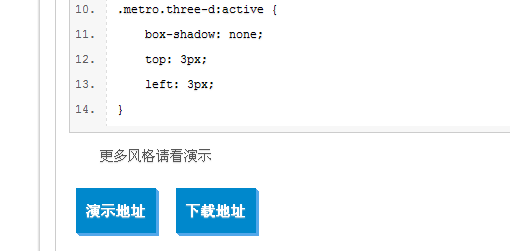
前臺效果圖
到這里,本教程全文完畢。
? 步驚云
步驚云